Welcome to the Virtual Pharma Expo Sponsor Portal.
Our goal is to ensure you have all the information you need to prepare a successful presentation. Please familiarize yourself with our list of FAQs below at your earliest convenience. Our event team can assist with any additional questions you might have. A unique link to "Submit Materials" can be found in the Presenter Materials preview located in the right column of this page.
Important Deadlines:
Company Info Due: Upon Portal Access
• Company name
• Company logo
• Company website
• Description (short bio, 1-4 sentences)
• Primary contact person information
○ Name
○ Email
○ Optional mobile number
Presenter Details Due: April 8
• Name
• Title
• Email
• Optional mobile number
• Headshot
Presentation Details Due: April 22
• Short abstract about presentation (1-2 sentences)
• Format
• Related content for download from console
○ Will use slide deck if nothing else submitted
• Optional virtual background
• Tech check scheduled
Final Materials Due: May 6th
• Slide deck
• Seed questions
• Optional poll question
• Tech check completed
Virtual Pharma Expo is a free online event created by Pharmaceutical Online and Federal Equipment Company. It helps professionals in pharmaceutical manufacturing discover the right tools, equipment, and solutions to solve real industry challenges.
This event is an easy, cost-effective alternative to traditional in-person expos—and attendees love the convenience of participating from their own screens.
Who Should Attend?
- Pharmaceutical manufacturers
- Sponsor companies
- Industry consultants
- Presenting and non-presenting companies affiliated with Pharmaceutical Online
Event Start & Duration
- The event begins at the start time listed on the registration page.
- Each company presents for about 20 minutes.
- Including intros, transitions, and closing remarks, the full session lasts no more than 2 hours.
Speaker Availability
- Log in 30 minutes before the event starts.
- Stay connected until your presentation is complete—even if you're presenting later in the lineup.
- Presenters must be ready to go immediately after the speaker before them.
- You’ll be off camera and muted while waiting, but stay alert in case the schedule shifts.
- Once finished, you’re free to log off.
Presentation Schedule
- The final speaking order is shared about 3 weeks before the event.
- The moderator opens the session with a 2–3 minute intro.
- Tell your audience to join at the official start time to avoid missing your talk.
Estimated Time Slots:
- Company 1: 10:05–10:20am ET
- Company 2: 10:20–10:35am ET
- Company 3: 10:35–10:50am ET
- Company 4: 10:50–11:05am ET
- Company 5: 11:05–11:20am ET
- Company 6: 11:20–11:35am ET
How to Register
- Anyone attending (clients, peers, etc.) must register via the registration page.
- Registration stays open through the end of the event.
Do Presenters Need to Register?
- No. Presenters will get a private calendar invite with an access link.
- Make sure it’s accepted and on your calendar.
How to Join
- Use your personalized calendar invite link to access the session.
- Need it resent? Contact Courtney Cornell at ccornell@vertmarkets.com.
Will I Be On Camera?
Yes. You must be on camera during your live presentation.
Is the Event Live or Pre-Recorded?
This is a live event. Fully pre-recorded presentations are not accepted.
Can I Include Video?
Yes — you have two options:
- Include a video (up to 8 minutes) as part of your 20-minute session.
- Share a video link as your downloadable asset (replaces the slide deck download).
Note: Videos must be directly related to your product or solution.
Can We Have More Than One Presenter?
- Typically one presenter per company is allowed.
- If you need more, request this by the "Presenter Info" deadline—we’ll try to accommodate.
What Should My Presentation Include?
You have 20 minutes to engage your audience. Common formats:
Option 1: Highlight a product or solution with key features and benefits
Option 2: Discuss market challenges and how your offering fits in
Suggested Flow:
- Intro (1–2 min): Brief company overview (1–2 slides)
- Product/Solution (4–6 min): Live walkthrough using PowerPoint
- Visual Demo (optional, 6–8 min): Live or recorded demo, screen share, or short video
- Live Q&A (1–2 min): Moderator-led audience questions
Tips for a Great Presentation:
- Use high-quality visuals and sound
- Present from a quiet, well-lit space
- Be authentic, enthusiastic, and clear
- Show your solution in action if possible
Can I Watch Past Presentations?
Yes — You can view previous Virtual Pharma Expo presentation here.
What You’ll Need
- Strong internet connection
- Laptop/desktop with webcam
- Wired mic or headphones (no Bluetooth)
- Google Chrome browser
- PowerPoint (16:9 format; no PDFs)
For Live Demos (Optional)
Options:
- Use a laptop with a wired webcam and stabilizer (e.g., Logitech BRIO + Joby GorillaPod)
- Rent gear or hire a video crew
Where Should I Present From?
- Ideally, present in front of your equipment or from a quiet, branded setting
- Submit any virtual backdrops in advance
- Reach out if your space has background noise—we’ll schedule a test
What Is the Tech Check?
A required pre-event session to test your setup, scheduled 1–2 weeks before the event.
- Use the same gear and location as the live show
What Will Attendees See?
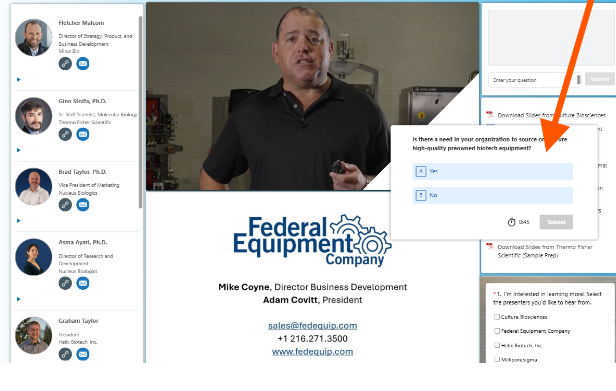
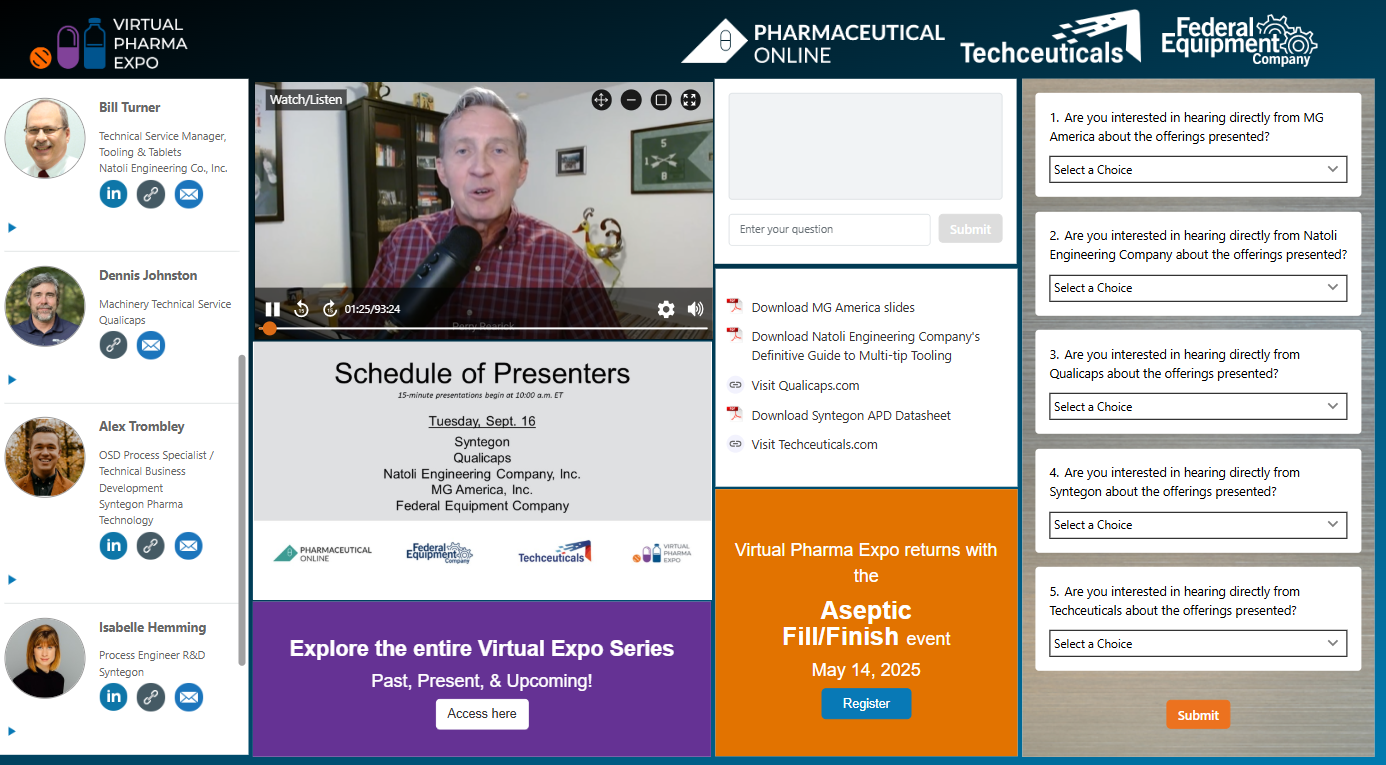
- Live Video Feed: Streams your presentation
- Slide Viewer: Displays your slides as you advance
- Q&A Box: Attendees can submit questions (not visible to other attendees)
- Speaker Info: Name, title, company, email, LinkedIn link
- Interest Survey: Attendees can request to be contacted post-event
- Company Profile: Logo, description, and downloadable asset
How Many Assets Can I Share?
You may share one downloadable asset. You’ll get click data after the event.
What Asset Should I Use?
The PDF version of your slide deck is the default. Other options include:
- Short video
- Product sheet
- White paper
- Website link
Who Will See the Event?
The event is promoted to:
- Life Science Connect and Pharmaceutical Online subscribers
- Techceuticals and Federal Equipment Co. contacts
- Your clients (if you choose to promote)
How Is It Promoted?
- Email campaigns
- Websites
- Social media
- E-newsletters
How Can I Promote It?
Promotion is optional but recommended—especially 2 weeks before the event.
We’ll provide a custom speaker promo image (once you submit your presenter info).
Need more materials? Email ccornell@vertmarkets.comWhat Do You Need from Me?
Company Info: (7 weeks out)
- Company name
- Company logo
- Company website
- Description (short bio, 1-4 sentences)
- Primary contact person information
- Name
- Optional mobile number
Presenter Details: (5 weeks out)
- Name
- Title
- Optional mobile number
- Headshot
Presentation Details: (3 weeks out)
- Short abstract about presentation (1-2 sentences)
- Format
- Related content for download from console
- We will use your slide deck if nothing else submitted
- Optional virtual background
- Tech check scheduled
Final materials: (1 week out)
- Slide deck
- Optional seed questions
- Optional poll question
- Tech check completed
How Do I Submit Materials?
Use the Materials Submission Form in your welcome email. Large files? Use WeTransfer or Dropbox.
What’s Included?
As a presenting sponsor, you’ll receive:
- A 20-minute live presentation
- Full registrant list (within 1 week post-event)
- Q&A report from your session (within 1 week)
- Asset download report (within 1 week)
- Optional poll results (within 1 week)
- Company logo/name visibility on-screen and in promotions
- A video recording of your session (within 2 weeks)
How Can We Watch the Event Later?
- Available on-demand on On24 within 24 hours post-show
- Registered attendees receive an email with a viewing link
- Presenters can also access the replay via the registration page
- All presentations will be posted to the Virtual Pharma Expo page about 3 weeks later
Need help? Contact ccornell@vertmarkets.com
Can We Promote the Event After?
Yes — and we encourage it!
- Share the event on LinkedIn from the Virtual Pharma Expo page
- Post your session link from the registration page
- Add your video cut (delivered within 2 weeks) to your website or social media
What Is It?
You can include one poll question during your presentation. You’ll receive full responses (with contact info) within a week of the event.
What You Need to Submit:
- Your question
- Answer type: multiple choice, select all that apply (up to 12), or free form
- Answer options (if applicable)
- Whether you want to show results live
- Optional: when to display the results (e.g., "slide 5")
Tips for a Great Question:
- Keep it short and easy to answer
- Make it relevant to your presentation
- Avoid overly salesy language
- Use it to gain insight into your audience or qualify leads
When to Submit It:
Poll questions are due with your other presentation materials via the Materials Submission Form.